
Row, row, row your boat gently up / down the stream???
Purpose (RECALL): This blog post is created to help readers a) better understand electronic compass [smartphone or rangefinder] residual azimuth deviation errors b) quantify the errors, c) model the errors, d) compensate [correct] the errors, and e) influence the app vendors to apply the correction method within the affected smartphone app. Basically, we need to know (accurately) whether to go up / down the stream (path) we are traveling on.
Goal: The goal of this blog post is to demonstrate the accuracy (or lack thereof) of the iPhone / Pro Compass app.
Justification: Over the past several years, hundreds and thousands of smartphone users have complained (internet users’ forums) about their inability to successfully use the compass apps – and rightly so. “Experts” have offered many “fixes” to resolve the issue; yet smartphone compass apps (all) have remained notoriously inaccurate – and for good reason. Residual (after calibration) azimuth deviation errors really do exist – resulting from local environmental magnetic/electromagnetic influences.
Hypothesis: After recognizing a problem (error), if the error can be predicted, the error can be corrected (compensated).
Problem Statement: How can electronic compass azimuth errors be predicted (quantified / modeled) and then be compensated (corrected) in real world situations?
Solution Characteristics: In order for electronic compass azimuth errors to be compensated (corrected), the following statements should be true.
- The error must be quantified – throughout the entire 360-degree range of measurement – in a manner that adds minimum cost to the user in terms of a) out-of-pocket expense, b) time and effort, and c) investment in education and/or training. This means that descriptive data must be collected to quantify the error.
- Manufacturer’s recommended compass calibration procedures must be factored in (and applied) to account for the “hard iron” and “soft iron” effects attributed by the materials and component(s) arrangements within the electronic compass itself. The electronic compass azimuth error to be compensated is the residual (after calibration) error resulting from environmental magnetic / electromagnetic influences – external to the electronic compass itself.
- The data collected about the compass azimuth deviation error must be “modeled” in such a way that the predicted error can be “added back” (subtracted) from the original erroneous azimuth readings to compensate (correct) the error(s) – in a repeatable and reliable manner over the entire 360-degree range of measurement – within the local environment, over a wide geographic area.
Solution Defined: The TruPath Compass smartphone app (soon to be released) exhibits all the positive solution characteristics stated above. TruPath Compass actually fixes the problem stated above – electronic compass errors.
Background:
This post takes a look at the residual (after calibration) azimuth errors experienced when using the iPhone / Pro Compass app. The reader will discover that the azimuth errors experienced by the iPhone / Pro Compass app are cumulative and progressive as the iPhone is rotated clockwise – through multiple 360-degree (full) rotations (Portrait orientation).
The data collection procedures used for this demonstration are those automated augmented reality (AR) procedures available via the TruPath Compass app hosted on an Android (Samsung S23 MAX) smartphone. Refer to the original post/page at http://www.tru-path.org for more examples for collecting residual (after calibration) azimuth deviation error data.
- A “reference” azimuth was established using the TruPath Compass app to determine the sun position (solar azimuth derived using a “vertical” shadow) relative to the observer’s (geographic) location on the date/time the demonstrations were performed – a correct, defendable, and independent reference direction. The “vertical” shadow was cast by a vertical stake.
- The Android/TruPath Compass app and the iPhone/Pro Compass app were set to indicate azimuths relative to True North.
- The smartphone (sensors) compass was re-calibrated prior to initiating data collection.
Some controlling, fundamental facts that need to be kept in mind include:
- Residual (after calibration) compass azimuth deviation error exists; and the error magnitude varies throughout the entire 360-degree range of measurement.
- Compensation of residual (after calibration) azimuth deviation error is device (and installation) specific.
Notes: Faster, Better, Cheaper Azimuth Deviation (error) Data Collection
Typically, when collecting azimuth deviation data using the TruPath Compass app,
- Effort: The time required to collect azimuth deviation data (using the TruPath Compass app) is less than 4 minutes – for each orientation (portrait, landscape, or horizontal) of the smartphone in most cases.
- Circumstances:
- On sunny days, take advantage of the shadow of a vertical object (wooden stake, light poles, edge of building, standing person, etc.) to establish a base (reference) azimuth – using TruPath Compass’ determination of the sun’s azimuth to obtain unquestionable accuracy.
- On cloudy days, establish a base (reference) azimuth with a “distant feature” using TruPath Compass’ background map. The geographical location of the distant feature can be edited (using either land survey, map, or GPS coordinates) to improve accuracy.
- Operation Modes: (for general-use or when collecting azimuth deviation data)
- Handheld
- Tripod
Recall the Objectives
Considering a real-world operating situation, this blog post will demonstrate the use of a calibrated smartphone electronic compass app (along with the TruPath Compass app) to:
- Collect residual [after calibration] azimuth deviation [error] data faster, better [easier], cheaper and
- Analyze the collected deviation data to produce a deviation compensation curve(s) – for the purpose of effectively compensating the residual azimuth deviation error(s) exhibited by the specific electronic compass/compass app.
The Demonstration (test) Environment
- The test site was situated in a generally benign urban setting – a “common” area (backyard) of a typical established residential neighborhood.
- The solar azimuth was used as the reference azimuth (derived/based on the shadow of a vertical stake for the location, date, and time of the test).
- The Android phone (running the TruPath Compass app) was handheld.
- The iPhone/Pro Compass was mounted on a tripod (equipped with an azimuth ring) aligned to the solar azimuth.
- The iPhone’s compass sensor(s) were re-calibrated prior to the performance of the test.
- The Pro Compass azimuth readings (and thus the azimuth deviation error data) were collected in 45-degree increments (mechanically controlled by the indexed tripod compass ring) using a clockwise rotation – for three (3) successive rotations.
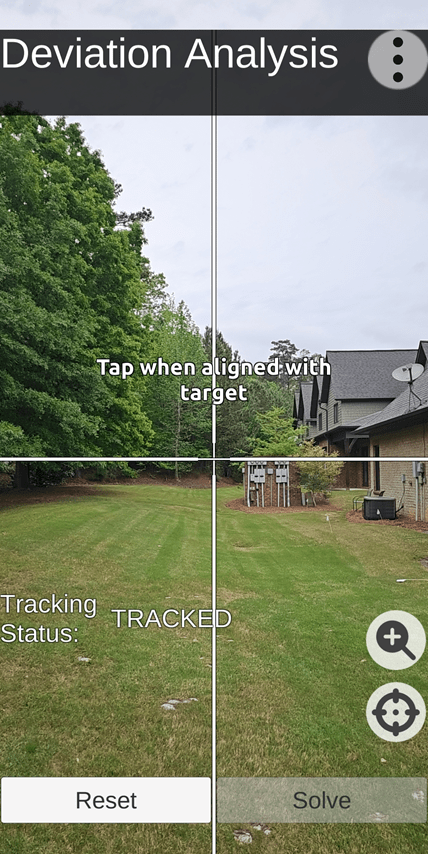
Test Site: TruPath Compass Screenshot Facing True North
Test & Analysis Results
The following five (5) charts depict the test results involving the performance (accuracy) of the Pro Compass app as operated on an iPhone 12 MAX.
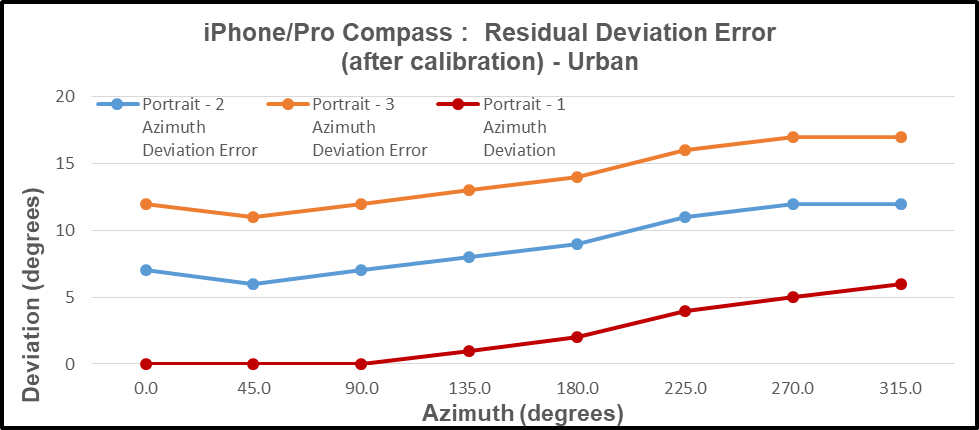
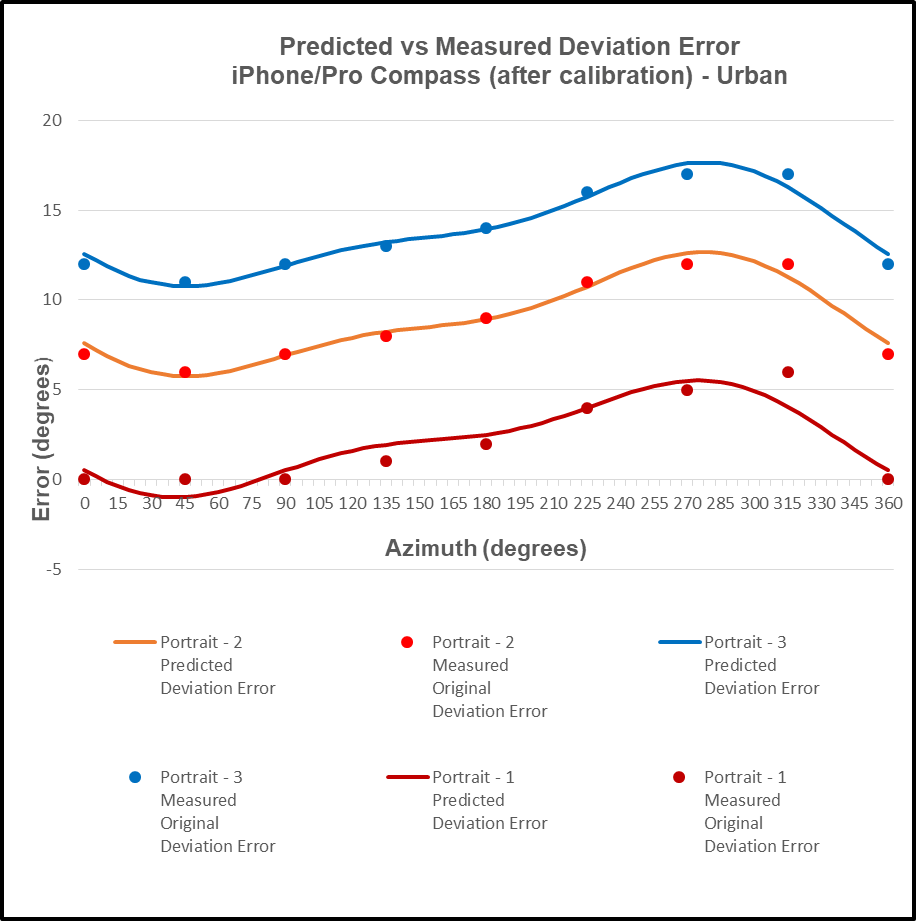
In the first chart (below), the observed (cumulative and progressive) residual azimuth deviation errors varied throughout the entire 360-degree range of measurement – over three (3) successive 360-degree revolutions (clockwise).
- First Revolution: 0.0 < azimuth error < +6.0 degrees
- Second Revolution: +6.0 < azimuth error < +12.0 degrees
- Third Revolution: +12.0 < azimuth error < +17.0 degrees
Imagine what this app would do to you on an orienteering or geocaching course.
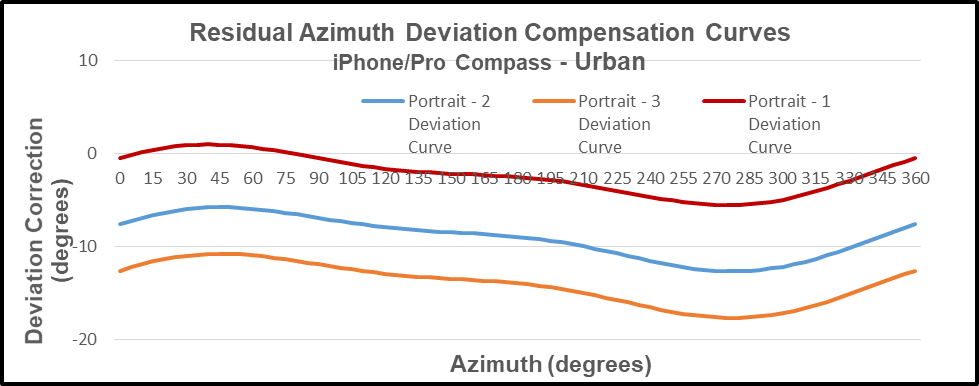
In the second chart (below), the residual azimuth deviation errors were evaluated and modeled to produce deviation compensation curves – one curve for each revolution through 360 degrees.
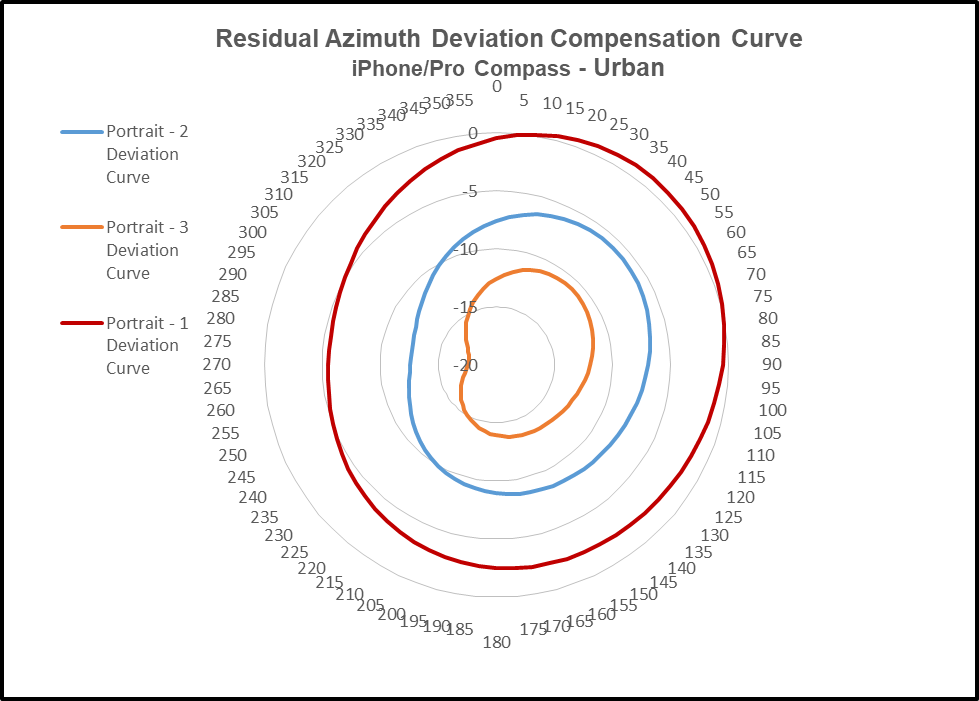
In the third chart (below) the respective (3) deviation compensation curves are depicted as a polar chart to emphasize the change in both magnitude and direction of the azimuth errors encountered.
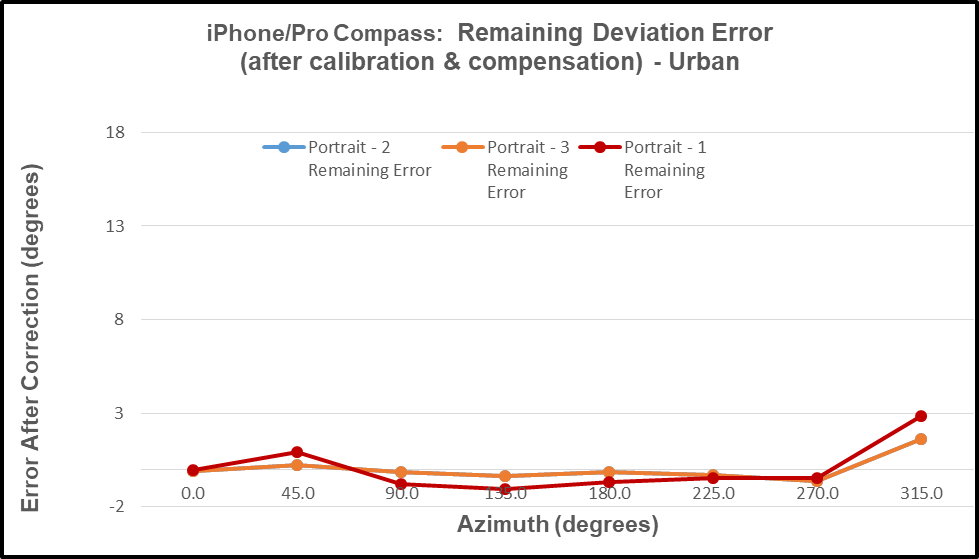
The fourth chart (below) depicts the “after compensation” (remaining) azimuth errors – illustrating the effectiveness of the TruPath Compass azimuth error compensation mechanism.
The negative (inverse) of the compensation curve is the “predictor” of the compass azimuth deviation error. In the fifth chart (below), the predicted azimuth deviation error curve agrees well with the actual measured deviation error points collected.
User Value Proposition (Conclusions)
Conclusion: The specific combination of iPhone / Pro Compass app exhibits inaccuracies (cumulative and progressive); and this combination should not be used for any applications of consequence – as for all other smartphone compass apps evaluated by this author.
Conclusion: As observed in the test case (demonstration) described above, the necessary and sufficient combination of a) the manufacturer’s recommended calibration procedure and b) TruPath Compass’ compensation techniques produced superior azimuth error compensation results – the author’s own intent – improved smartphone compass app accuracy.
Conclusion: The “experts” who publish reviews of smartphone compass apps need to extend their “analysis” methods to include an evaluation/determination of the compass app’s accuracy (or lack thereof) – and not just some casual assessment of the app’s features.
Conclusion: Smartphone compass users [customers] can a) use the TruPath Compass smartphone app to collect residual azimuth deviation [error] data from any electronic compass employed in a wide variety of real-world operating conditions – in a faster, better (easier), and cheaper way – and b) receive the TruPath Compass azimuth error compensation coefficients [correction parameters] immediately – to be shared with the compass app’s vendor [or the user’s own software] to compensate the azimuth errors being encountered locally.
Conclusion: As a direct result of TruPath Compass’ capability to easily and swiftly a) collect and analyze residual azimuth deviation error data and b) compensate for such errors, the currently existing smartphone compass apps (Android and iOS) should be declared obsolete.
 Tru-Path
Leave a comment