Case Studies 4-A & 4-B: iPhone/SpyGlass

Row, row, row your boat gently up/down the stream???
Purpose: This blog is created to help readers a) better understand electronic compass [smartphone or rangefinder] residual azimuth deviation errors b) quantify the errors, c) model the errors, d) compensate for [correct] the errors, and e) influence their app vendor to apply the correction method within the affected smartphone app. Basically, we need to know (accurately) whether to go up / down the stream (path) we are traveling on.
Background: Case Study (4 – A)
This post will present the test results of the iPhone/SpyGlass compass app operated at the Birmingham, AL test site with a strong magnetic / electromagnetic field. Recall that previous posts in this series presented the test results of a) the Vectronix PLRF25C (with compass) and b) multiple iPhone compass apps operating at the Birmingham, AL test site with a strong magnetic/electromagnetic field.
The Birmingham, AL (4-A) test site is set in an urban environment with strong magnetic/electromagnetic influences including:
- An electric power distribution station for eight (8) townhomes
- At least eight operating heating/cooling (heat pump) units of 3 to 4 ton capacity – aligned North/South within 50 feet of the test site (East side)
- An active highway – aligned North/South within 150 feet of the test site (West side)

Preview: The Picayune, MS test site (4-B) exists in a 20 acre cow pasture with minimal magnetic/electromagnetic influence (field). The cattle were curious (disruptive) about what was taking place in their pasture. Recall that the Picayune, MS test site is 264 miles southwest of the Birmingham, AL test site.
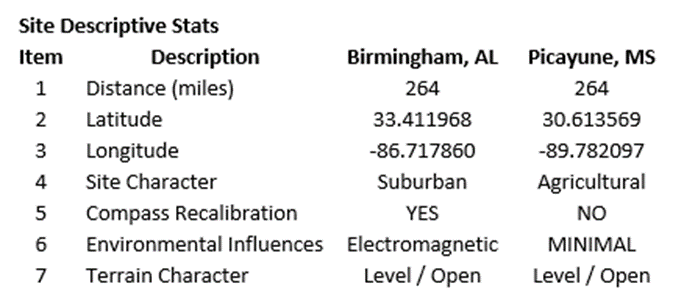
The major issues at the forefront of this test include:
- What is the impact (if any) of changing location (latitude change) on the effectiveness of the method for correcting residual compass (azimuth) deviation errors – for the Vectronix PLRF25C rangefinder (with compass)? Fact: The earth’s magnetic field strength changes with the geographic location of the observer.
- What is the impact (if any) of changing the operating environment (minimal magnetic/electromagnetic influence) on the effectiveness of the method for correcting residual compass (azimuth) deviation errors – for the Vectronix PLRF25C rangefinder (with compass)? Fact: Electronic compass results (azimuth readings) are impacted by environmental influences.
- What is the impact (if any) of not recalibrating the rangefinder compass on the effectiveness of the method for correcting residual compass (azimuth) deviation errors – for the Vectronix PLRF25C rangefinder (with compass)? Fact: The author was entirely willing to accept any error that may result from the decision not to recalibrate the device being tested – relying on the capabilities of the compensation method to correct the potential azimuth errors.
The Test Results (4-A)
The data collection equipment and procedures used at test site A (Birmingham, AL) were identical to those used at test site B (Picayune, MS). Also, these data collection procedures were the same as used for testing the compass accuracy of a) the Vectronix PLRF25C laser rangefinder and b) multiple iPhone/compass app combinations – refer to earlier posts.
At both test sites, the reference direction (True North) was established using sun position – a correct, defendable, and independent reference direction.
- True North (reference direction) was established based on the sun position relative to each test site’s geographic location on the date/time of each test.
- The iPhone compass was set to indicate azimuths relative to True North.
Preview: As we proceeded with the each iPhone compass app (one after another), we noticed that each app appeared to have its own internal proprietary processing procedure to provide its “best” result for each azimuth reading – yet each app’s azimuth deviation (error) values were unique. Also, each compass app had its own quirks relative to the data collection process. For instance, due to the sensitivity of some apps, the data collection process was executed as follows: (using ONLY)
- Slow, deliberate movements
- Clockwise rotations
- Left-to-right motions
- No jerky movements
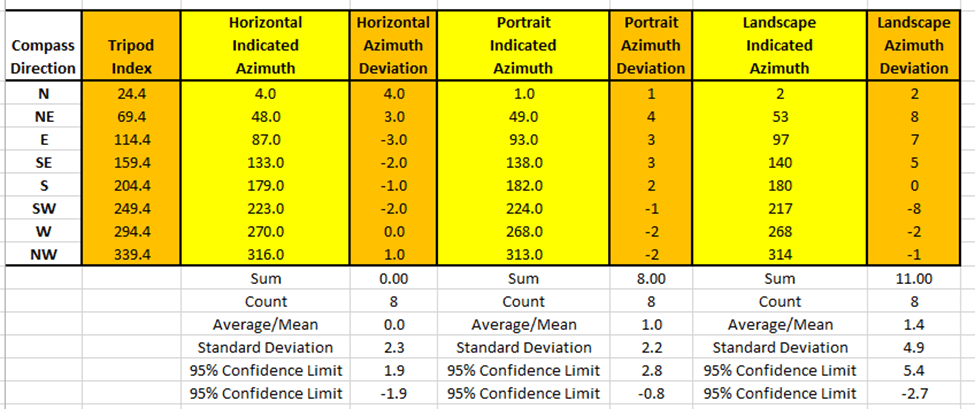
Recall: The residual compass deviation error persists throughout the entire 360 degree range of measurement. The following data table presents the collected azimuth data collected (yellow) and the associated azimuth deviation error (orange).
It is interesting to contrast (graphically) the residual compass azimuth deviation errors across multiple apps – to determine the consistency (or lack thereof) between apps being executed on a single smartphone.
- In general, the shapes of the iPhone compass app (error) curves were relatively consistent – the data was collected using the same iPhone, on the same day, and in the same location.
- The relative positions of each (Horizontal, Portrait, and Landscape) curve were relatively consistent.
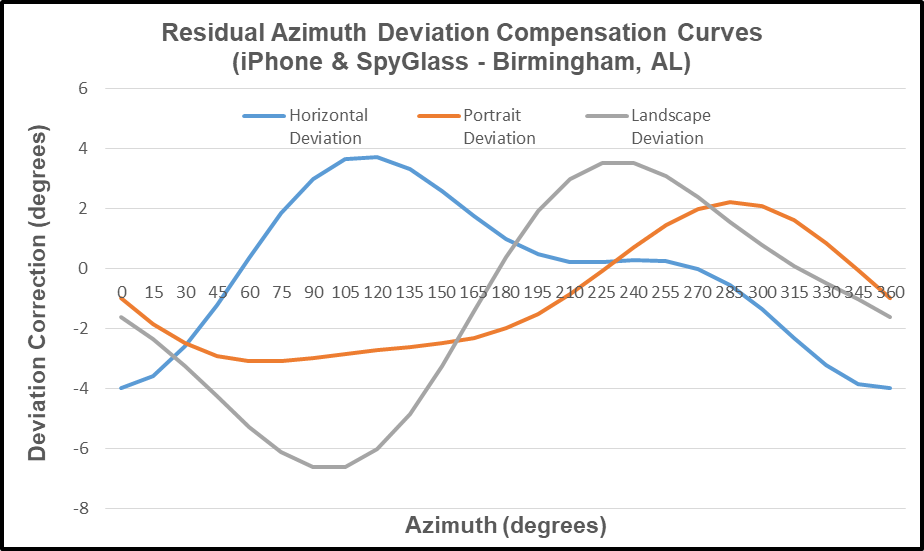
The “modeled” deviation curves (derived from the residual deviation errors) for the iPhone/SpyGlass app are presented below. The modeled residual azimuth deviation compensation curves are presented in two different formats to allow the reader to seriously consider the deviation error – as measured throughout the full 360 degree range of measurement.
Recall that if the observed azimuth deviations (errors) are reasonably repetitive (within reasonable measurement accuracy), then the deviations can be predicted – and thus corrected.
Note (below) that the modeled deviation curves of each iPhone app retain a “similar” relative relationship (shape) with each other. However, the magnitudes and directions of the deviation error may differ quite a bit – unique to the particular app being studied.

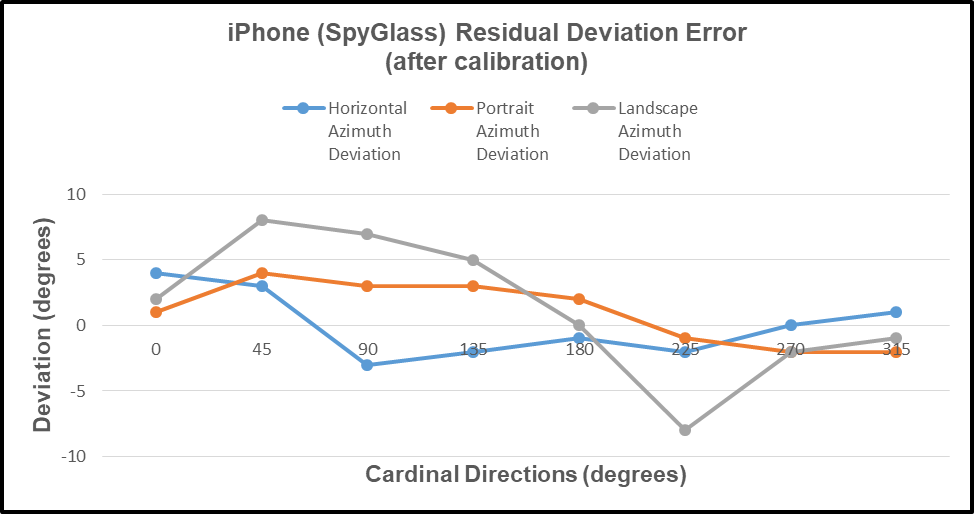
The compensated deviation errors (remaining azimuth errors after compensation) for the iPhone/SpyGlass compass app are depicted below. Again, two display formats are provided to strengthen the perceived impact of the compensation method.
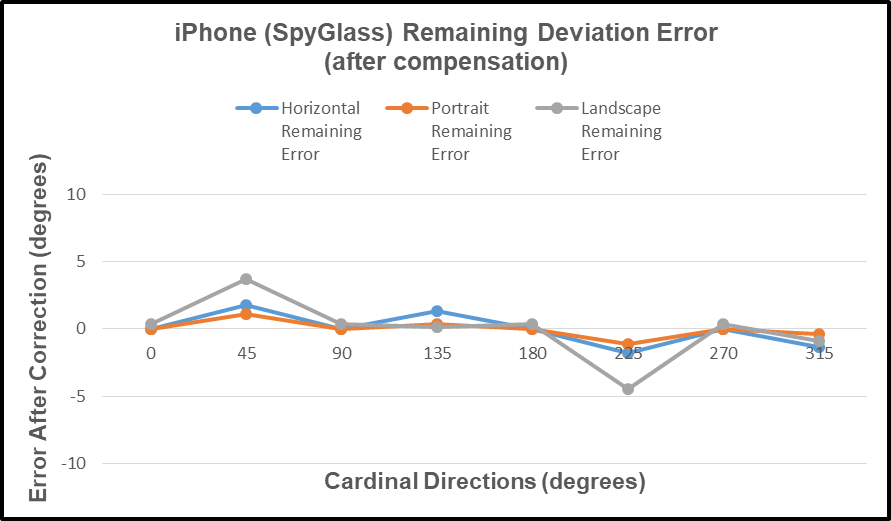

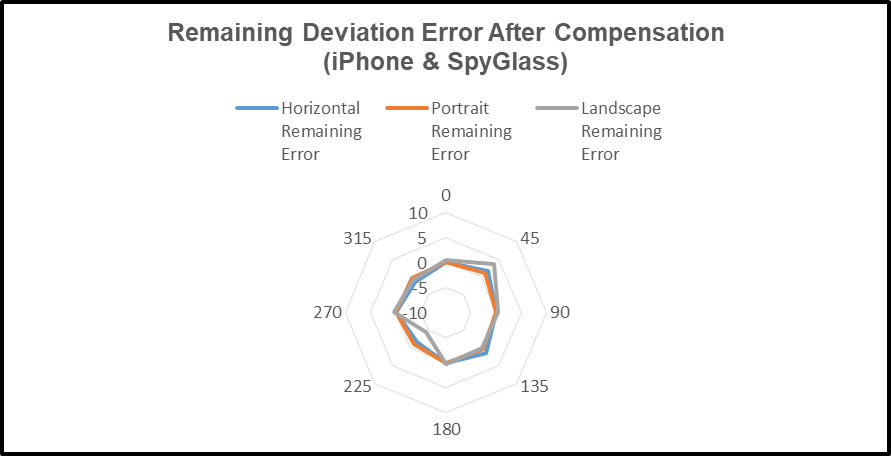
Application of the compensation method resulted in a significant reduction in azimuth error.
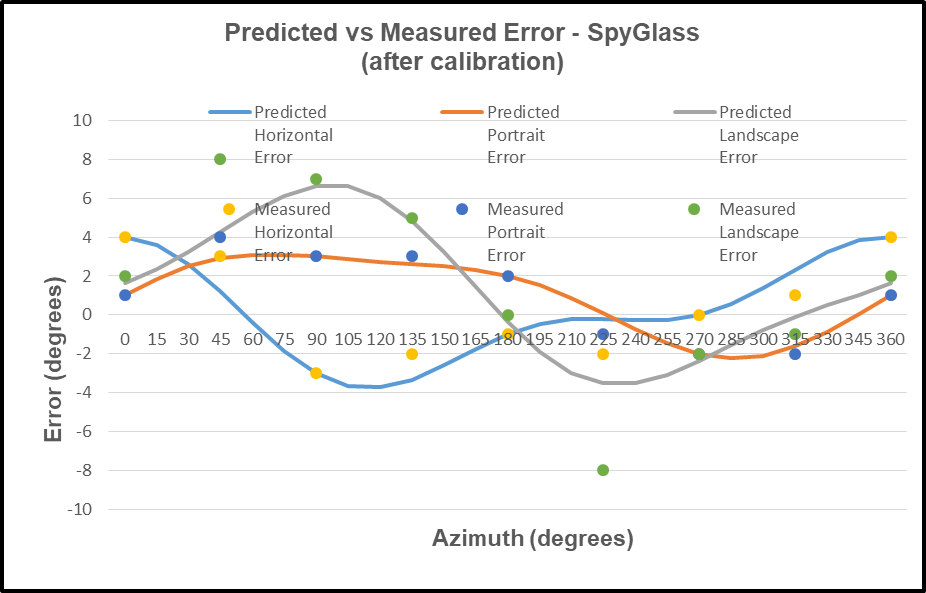
The predicted deviation errors for the iPhone/SpyGlass compass app are depicted in the following chart. The predicted error curve is the negative of the deviation curve; and the compensation method proved quite effective.
The reader should note that the Vectronix azimuth readings (previous post) indicated a stable/consistent electronic compass and software; while the iPhone compass apps – not so much. It seems apparent that the iPhone app vendors all have their own preferences for handling the data provided by the iPhone electronic compass; and some vendors have gone to great lengths in their attempt to provide a good azimuth reading – without so much success. Some observations made during the author’s attempt to capture good azimuth readings from the iPhone apps are offered below.
- For certain apps, rotating the iPhone very slowly can result in NO change in the reported azimuth value. Tapping the iPhone (after rotating with no change) can result in a sudden change to a new azimuth value – the apparent “correct” value.
- For certain apps, rotating the iPhone in an counter-clockwise direction can give results that are slightly different from those obtained when using a clockwise rotation – repeatability not so good.
- For certain apps, avoid jerky motions – unexpected results may appear.
- For certain apps, the results provided change with time – even a few seconds make a difference. This trait does not indicate a high degree of reliability.
- For all apps, the reader should have a little patience in order to capture the best data possible.
The Test Results (4-B)
As the second test of the iPhone/SpyGlass began, it quickly became clear that the SpyGlass application exhibited so many quirky characteristics that the test could not be performed (at the second test site) to the same level of quality as the other apps provided. In particular,
- The screen color schemes did not present enough contrast with the bright sunny background to allow the user to even accurately read the azimuth values – poor choice of color.
- Inadvertent switches in screen function resulted from the slightest touch of the screen or unintentional movement of the iPhone.
- Other quirks which were equally annoying.
It was disappointing to the author that the three major issues regarding a) change of location, b) changing the operating environment, and c) not recalibrating the iPhone compass would not be clearly resolved for the iPhone/SpyGlass compass app. However, with the other case studies available, there should be sufficient evidence for the reader to conclude that the method of compass error compensation would be minimally affected by these three issues for the iPhone/SpyGlass compass app as well.
With the author’s disappointing field data collection experience at test site 4-B, the reader should take notice that whichever compass app he chooses for his own field exercises should be field tested under the expected real-life environmental conditions of practical use before the app is relied on in the field.
Recall that the measured residual deviation (azimuth) errors of case study 4-A were (quite adequately) compensated in that test.
Also, the reader can recall that these blog posts represent a series of posts dealing with the subject of “Fixing Rangefinder & Smartphone Residual Compass (azimuth) Deviation Errors”. All the subsequent posts in this series will follow a similar format. To date, four posts have been published:
- Vectronix PLRF25C Laser Rangefinder,
- iPhone/Compass 55,
- iPhone/Compass Deluxe, and
- iPhone/SpyGlass.
In the upcoming blog post, we will deal with the iPhone (with compass) and the Theodolite compass app. As with the previously reported tests of the Vectronix rangefinder and multiple iPhone compass apps, the same methods will be used to collect, analyze, and present the results. Good, complete results are to be expected for the iPhone/Theodolite compass app.
One response to “Fixing Rangefinder & Smartphone Residual Compass (azimuth) Deviation Errors – iPhone/SpyGlass”
-
[…] https://wordpress.com/post/tru-path.org/562 […]
LikeLike
 Tru-Path
Leave a reply to Fixing Rangefinder & Smartphone Residual Compass (azimuth) Deviation Errors – List of Posts – Tru-Path Cancel reply